Welcome! Guest
New User? Register | Login
Learn n Earn
Home » BASIS »

How to enable Save to local file option

By: Shailesh Singh | 11 Nov 2009 1:32 am

I have created one role to display transactions that can be executed by a user.

After executing the transaction ( S_BCE_68001426),  it shows relevant information.
I want to save this information in a excel file.

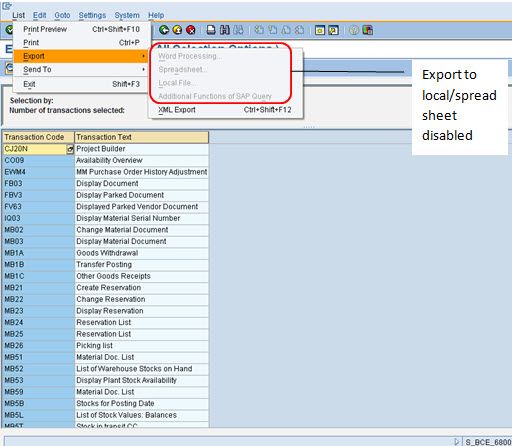
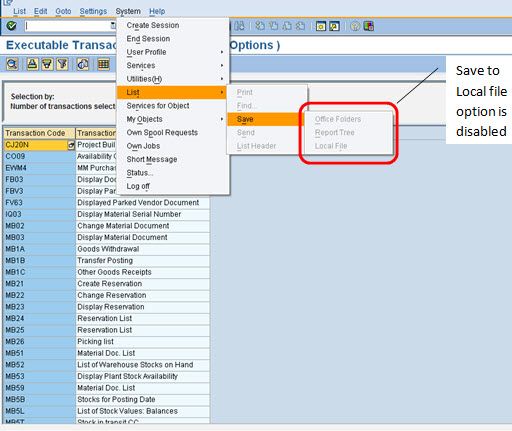
But the options to save this information to excel file available via :
1) system --> List --> Save --> Local file
or
2) List --> Export --> spreadsheet

are disabled.

But if I execute this transaction ( same is the case some other Transactions) with user having SAP_ALL, I get the option to save output to local file.

I have attached the screen-shots for your reference.

Please help to solve this problem.
Comments

go to su53 and check the obect .. then give the full auth.. of the object.
By: saperpguru | 11 Nov 2009
Definitely there is some problem with missing authorization.
Please run tcode su53 to get missing authorization and then assign it to that particular role
By: rekha | 11 Nov 2009
Since those options are disabled, it does not result in missing authorization.
So when I run SU53, it does not show missing authorization but says last authorization check was successful.
By: Shailesh Singh | 11 Nov 2009
n this role check for s_gui authorization object and values in activity
By: saperpguru | 11 Nov 2009
Adding authorization object S_GUI has solved the problem.
By: saperpguru | 11 Nov 2009

Leave a comment

image
Type the characters you see in the picture below.


Close Move